Token drift is silent. Here is how to catch it.
Overview
Design tokens drift quietly between releases. A color shifts slightly, a spacing value disappears, a border radius changes across components. Nobody notices in the moment. Over time the brand feels off, but nobody can point to when it happened. This article explains why token drift is hard to catch, why existing processes miss it, and what a baseline-based approach looks like in practice.
1.The brand guide says #0F3460. Production says #533483.
Nobody changed it on purpose. There was a design update six weeks ago, a fast implementation, a PR review that focused on behavior not pixels. The color is close enough that no automatic test caught it. The designer did not notice on a quick sign-off. The developer used the value from memory.
Now that color is in production, in dozens of components, across three pages. The brand guide still says #0F3460. The live site says something else.
This is token drift. Not a big incident. Not a conscious decision. Just the slow accumulation of small divergences that nobody had a system to catch.
2.Why it keeps happening
Design tokens were supposed to solve this. A single source of truth: name the value, reference it everywhere, change it in one place. The idea is correct. The execution breaks down between the design file and the deployed product.
The design file has tokens. The codebase has tokens. They are not always the same tokens. They drift apart during sprints, during handoffs, during "quick fixes." CSS variables get overridden. Hardcoded values creep in. The DTCG export from Figma and the actual CSS in production are siblings who stopped talking.
The deeper problem is that most teams have no instrument for measuring the gap. Design reviews are manual and slow. Visual regression tests catch layout changes but not subtle value shifts. Linters check code style, not semantic token compliance.
3.Why the standard process does not catch it
Design review happens before deployment, not after. By the time a design review occurs, the decisions are already made. The reviewer is approving intent, not measuring outcome.
Code review is focused on behavior and architecture. A reviewer checking a PR is asking whether the logic is correct, whether edge cases are handled, whether the API contract is solid. They are rarely asking whether the border radius matches the brand specification.
QA testing covers functional correctness. A button that opens the right modal passes QA. A button with the wrong color passes QA. The brand does not have a test suite.
4.Baseline thinking
The answer is not more process. It is a different instrument. Instead of reviewing tokens before deployment, you extract them after. You take a snapshot of what the live site actually looks like — colors, typography, spacing, shadows — and you treat that snapshot as your baseline.
Next week, after the next release, you extract again. You compare the two snapshots. The diff shows you exactly what changed: a color shifted from one hex to another, a spacing value was removed, a border radius increased. Not intentions. Not specs. What is actually in production.
This is the same logic that made git useful for code. You do not review code by memory. You diff it. The same discipline applied to visual tokens changes what you can see and when you can see it.
5.The workflow in practice
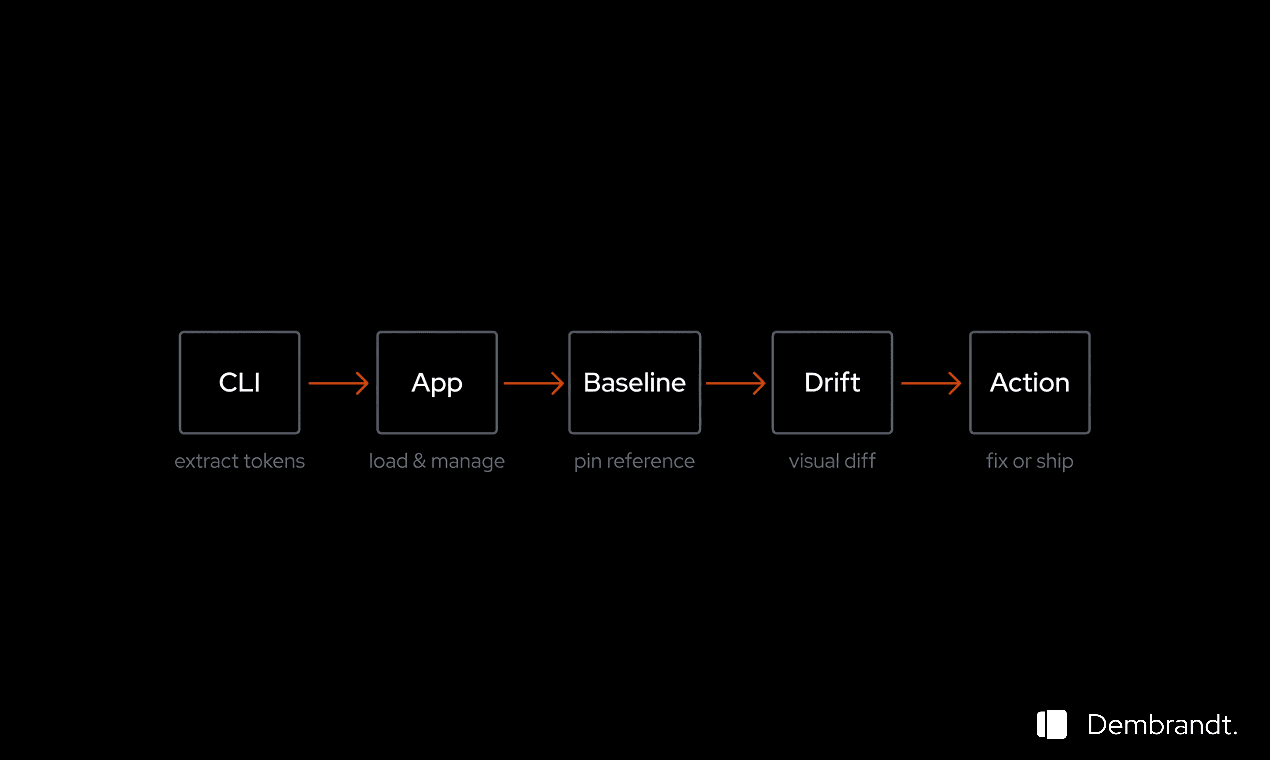
In concrete terms this is what it looks like. You run the Dembrandt CLI against your site and save the output. That extraction captures every color, font, spacing value, shadow, and border radius in use on the live product. You load it into Dembrandt App and mark it as your baseline.
After the next release you run the extraction again. The App compares the new snapshot against the baseline and generates a drift report. The report is organized by category. Under colors you see which values changed with a visual swatch showing before and after. Under typography you see which sizes and weights shifted. Under spacing you see what was added or removed.
Example drift report
~ [color] primary #0F3460 → #533483
- [spacing] 12px
~ [typography] Caption Inter 12px/500 → Inter 11px/500
- [radius] 12px
You can copy this report and share it with the team. You can paste it into Copilot, Claude, or Cursor and ask it to identify which component changes caused each drift. You can use it to file a precise bug report: not "something looks off" but "the primary color shifted by this exact delta."
6.What to do with the findings
A drift report is not a verdict. It is information. Some drift is intentional: you updated the brand color, you tightened the type scale, you removed a spacing value that was no longer used. The report surfaces all of it and lets you decide what matters.
Unintentional drift is the part that needs action. When you see a color that should not have changed, you now have the exact before and after values, the category, and the direction. That is enough to open a ticket, find the commit that introduced it, and fix it with confidence.
Run this after every release. The baseline becomes a living reference. Token drift stops being invisible. It becomes a measured, trackable, fixable property of your product.
Try it now
Run Dembrandt CLI on your site, load the output into Dembrandt App, and set your first baseline.
Related
Building your first design system
You inherit a brand guide, fifteen years of legacy UIs, and a request to build a coherent design system. How do you actually read a brand guide, derive UI states from one or two brand colours, set up a modular type scale, and decide what whitespace means for this product? A practical walkthrough.
Workflows That Pay Off
Modern design and development workflows are not about picking the fanciest tool. They are about shared understanding, a common end goal, and a workflow that fits the team you actually have.
Getting started
Install Dembrandt and turn any public website into a complete set of design tokens in under 2 minutes. All you need is Node.js and a terminal.